
A laptop is no longer optional for most students in South Africa. Whether you are attending lectures, submitting assignments, researching, or learning new skills, the right device can make studying smoother — while the wrong one can create daily frustration.
This guide breaks down how students can choose the best laptop for their needs without overspending. Instead of chasing the most powerful or expensive option, the focus here is practicality: affordability, reliability, battery life, and suitability for student workloads in South Africa.
Understanding What Students Actually Need From a Laptop
Many students assume they need the most powerful laptop available to succeed academically. In reality, most university and college tasks are far less demanding than people expect.
For the majority of students, laptops are used for:
- writing assignments
- watching lectures or recordings
- browsing academic resources
- basic data analysis
- communication and organisation
These tasks do not require high-end gaming machines or professional-grade hardware. What matters more is stability, battery life, and comfort during long study sessions.
Another important factor in South Africa is cost sensitivity/Price. Students often rely on NSFAS allowances, family support, or part-time income. Spending too much on a laptop can create financial pressure that lasts for years. Choosing a device that meets needs without excess is usually the smarter long-term decision.
Connectivity also matters. Students often work on campus, in residences, or at home with varying internet quality. A laptop that performs well offline, boots quickly, and handles multitasking smoothly can make a significant difference.
Finally, durability should not be overlooked. A student’s laptop is carried frequently, used daily, and exposed to movement and wear. Reliability often matters more than raw performance.
Understanding what you actually need — rather than what is marketed aggressively — helps students make better purchasing decisions and avoid regret.
Minimum Laptop Specifications Students Should Look For
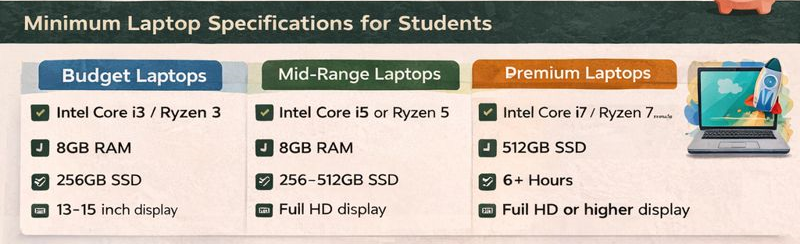
When choosing a laptop as a student, specifications matter—but only up to a point. Buying below a certain baseline leads to slow performance and frustration, while buying far above it often wastes money. The goal is to meet a practical minimum that will remain usable throughout your studies.
For most students, a modern processor is important. An Intel Core i3 or AMD Ryzen 3 is usually the minimum worth considering, while Intel Core i5 or Ryzen 5 offers a more comfortable experience. Older processors, even if cheaper, tend to struggle with multitasking and newer software.
Memory (RAM) has a major impact on everyday performance. A minimum of 8GB RAM is strongly recommended. Laptops with 4GB RAM often slow down quickly when multiple browser tabs, documents, and applications are open at the same time. If a laptop allows RAM upgrades later, that flexibility is a bonus.
Storage type matters more than storage size. An SSD (solid-state drive) is far more important than having large storage capacity. A laptop with a 256GB SSD will feel significantly faster and more responsive than one with a larger traditional hard drive. SSDs improve boot times, file access, and overall reliability.
Battery life is another key factor. Students often move between lectures, libraries, and residences, sometimes without access to power outlets. A laptop that can last at least 6–8 hours on a full charge is far more practical than one that needs constant charging.
Screen size and quality also affect comfort. A 13–15 inch display is usually ideal for portability and productivity. Full HD (1920×1080) resolution is recommended for clearer text and reduced eye strain during long study sessions.
Finally, consider ports and build quality. USB ports, HDMI output, and a solid keyboard are more important than ultra-thin designs. A sturdy laptop with a good keyboard will be used daily and should feel comfortable rather than fragile.
Meeting these minimum specifications ensures that a laptop can handle typical student workloads reliably without unnecessary expense. For most students, this balance matters more than chasing top-tier hardware.
Laptop Requirements by Field of Study
While most students can get by with similar baseline specifications, certain fields of study place additional demands on a laptop. Understanding these differences helps students avoid underbuying or overspending.
Students in humanities, education, law, commerce, and social sciences generally have the lightest requirements. Tasks in these fields usually involve writing, research, presentations, and online platforms. A reliable laptop that meets the minimum specifications outlined earlier is more than sufficient. Battery life and keyboard comfort matter more than raw processing power.
Science, engineering, and IT-related fields often require additional performance. Programming environments, data analysis tools, simulations, and specialised software benefit from a stronger processor and more memory. For these students, an Intel Core i5 or Ryzen 5 processor and at least 8GB RAM is recommended, with 16GB being useful if budget allows. Storage speed is also important, as large files and applications are common.
Students studying accounting, economics, or statistics may use spreadsheet-heavy software and data tools. While not as demanding as engineering software, these applications benefit from a responsive system. A mid-range laptop with good multitasking capability makes long working sessions smoother.
For creative fields such as graphic design, architecture, video editing, or multimedia, requirements increase significantly. These students often rely on software that is processor- and memory-intensive. A more powerful laptop with strong performance, colour-accurate display, and higher RAM capacity becomes important. In these cases, prioritising reliability and performance is better than chasing ultra-budget options.
Students in health sciences often fall somewhere in the middle. While most academic tasks are standard, virtual simulations, online assessments, and digital resources can be demanding during peak periods. A stable, responsive laptop with good battery life is usually sufficient.
It’s also worth considering future-proofing. Students early in their degrees may face more demanding coursework later. Choosing a laptop that slightly exceeds current needs can extend its usefulness and reduce the likelihood of replacement before graduation.
Matching a laptop to your field of study ensures that the device supports your academic work rather than becoming a limitation. The right fit saves money, time, and unnecessary stress over the course of your studies.
Budget, Mid-Range, and Premium Laptop Categories (With Minimum Requirements)
Not all students have the same budget, and that reality needs to be respected. Grouping laptops into budget ranges helps students make decisions based on what is realistically available to them, rather than chasing ideal setups they cannot afford. Each category below includes minimum requirements to help avoid underpowered devices.
Budget Laptops (Entry-Level, Functional)
Budget laptops are best suited for students whose work is mainly text-based and online, such as assignments, research, presentations, and learning platforms.
Minimum requirements at this level:
- Intel Core i3 or AMD Ryzen 3 (or equivalent)
- 8GB RAM (avoid 4GB)
- 256GB SSD (avoid hard drives)
- Battery life of at least 6 hours
- 13–15 inch display
Students relying on NSFAS allowances or limited support often fall into this category. These laptops can handle general academic work reliably if chosen carefully.
Trade-offs are expected. Build quality may be basic and screens may be less bright, but performance should remain smooth for everyday tasks. Avoid older processors and non-SSD storage, as these cause slowdowns and frustration.
Budget laptops work best when expectations are realistic and usage is focused on core academic needs.
Mid-Range Laptops (Balanced Performance and Value)
Mid-range laptops offer the best balance for most students and are suitable for heavier multitasking and more demanding coursework.
Minimum requirements at this level:
- Intel Core i5 or AMD Ryzen 5
- 8GB RAM (16GB recommended if possible)
- 256–512GB SSD
- Battery life of 7–9 hours
- Full HD (1920×1080) display
These laptops are well-suited to commerce, science, IT, and mixed workloads. They handle multitasking smoothly and cope better with future academic demands.
For many students, this category provides the longest usable lifespan and the best value for money.
Premium Laptops (High Performance, Specific Needs)
Premium laptops are designed for students whose courses require higher performance and specialised software.
Minimum requirements at this level:
- Intel Core i7 / Ryzen 7 or higher
- 16GB RAM or more
- 512GB SSD or higher
- High-quality display (important for creative work)
- Strong build quality
These laptops are best for creative fields, advanced engineering, architecture, and intensive technical work. While powerful, they are often unnecessary for general academic use.
Students should avoid buying premium devices for status or appearance alone. Performance needs should justify the cost. In many cases, a well-chosen mid-range laptop will serve just as well.
Budget Laptop Recommendations for Students in South Africa
Budget laptops are often where students make the most costly mistakes, either by buying devices that are too weak or by overspending on features they don’t need. The options below focus on reliability, usability, and value, not brand prestige.
These examples are suitable for students in general degrees, education, humanities, law, commerce, and early-year study across most fields.
Acer Aspire Series (Budget Configuration)
The Acer Aspire range is widely available in South Africa and offers solid value when configured correctly. Models with an Intel Core i3 or AMD Ryzen 3 processor, 8GB RAM, and an SSD handle everyday academic tasks smoothly.
This range is popular because it balances affordability with decent performance and acceptable build quality. It’s a practical choice for students who need a dependable machine for writing, research, and online learning without unnecessary extras.
Best for: general academic use, NSFAS-funded students, first-time laptop buyers
Avoid: models with 4GB RAM or no SSD
Lenovo IdeaPad Series (Entry-Level Models)
Lenovo IdeaPad laptops are known for comfortable keyboards and practical designs, which matters for long study sessions. When equipped with at least 8GB RAM and an SSD, these laptops perform well for standard student workloads.
They are widely stocked by South African retailers and are easy to service or upgrade, which can extend their lifespan. Build quality is simple but functional.
Best for: heavy typing, long study sessions, everyday reliability
Avoid: older processors or entry models with limited storage
HP 15 / HP Pavilion (Budget Variants)
HP’s budget models are common across South Africa and are often available through major retailers. When properly configured, they offer a familiar, user-friendly experience and good support availability.
Students should be careful to choose configurations that meet minimum requirements, as HP also sells very low-spec versions that struggle with multitasking.
Best for: students who want wide support availability and local service options
Avoid: non-SSD models and low-RAM variants
Refurbished or Certified Pre-Owned Laptops (With Caution)
For students under severe budget pressure, refurbished laptops from reputable sellers can be an option. These should only be considered if they meet minimum specifications and come with a warranty.
Refurbished devices work best when purchased from established retailers rather than informal sellers. A warranty and clear return policy are essential.
Best for: tight budgets, short-term use
Avoid: devices without warranty or unclear history
Important Budget Buying Notes
At this level, configuration matters more than brand. Two laptops from the same brand can perform very differently depending on RAM, storage, and processor generation.
Students should prioritise:
- SSD storage over large capacity
- 8GB RAM over slim design
- reliability over appearance
A modest but well-chosen budget laptop can comfortably support an entire degree if treated carefully and used within its limits.
Mid-Range Laptop Recommendations for Students in South Africa
Mid-range laptops offer the best balance between performance, durability, and long-term value. For many students, especially those in commerce, science, IT, and mixed workloads, this category provides the smoothest experience across an entire degree.
The laptops below are examples of well-regarded mid-range options commonly available in South Africa, when configured correctly.
Lenovo IdeaPad / ThinkBook Series (Mid-Range Configurations)
Lenovo’s mid-range IdeaPad and ThinkBook laptops are popular among students because they combine strong performance with practical design. When equipped with an Intel Core i5 or AMD Ryzen 5 processor and at least 8GB RAM, these laptops handle multitasking, heavier coursework, and extended study sessions comfortably.
ThinkBook models in particular tend to have better build quality and keyboards, making them suitable for students who spend long hours typing or working with multiple applications.
Best for: commerce, IT, science, and mixed workloads
Recommended configuration: Core i5 / Ryzen 5, 8–16GB RAM, SSD
Avoid: entry-level variants with limited memory
HP Pavilion / HP ProBook (Mid-Range Models)
HP’s Pavilion and ProBook ranges offer a step up from entry-level devices, with improved performance and more solid construction. ProBook models are especially popular in professional and academic environments due to their reliability and comfortable keyboards.
These laptops work well for students who want something durable enough to last several years without moving into premium pricing.
Best for: long-term use, structured workloads, reliability
Recommended configuration: Core i5 / Ryzen 5, SSD, Full HD display
Avoid: touchscreen-only upgrades that raise price without adding academic value
Dell Inspiron Series (Mid-Range Options)
Dell Inspiron laptops are widely available in South Africa and are known for consistent performance and strong support networks. Mid-range Inspiron models handle everyday academic work, data analysis, and moderate programming tasks with ease.
Their advantage lies in stability and support rather than cutting-edge features.
Best for: students who value support and service availability
Recommended configuration: Core i5 / Ryzen 5, 8GB RAM minimum
Avoid: older generations at inflated prices
ASUS VivoBook Series (Mid-Range Variants)
ASUS VivoBook laptops offer good performance in relatively lightweight designs. Mid-range configurations are suitable for students who want portability without sacrificing too much power.
Battery life and build quality vary by model, so checking specifications carefully is important.
Best for: students who commute or move frequently
Recommended configuration: Ryzen 5 / Core i5, SSD, Full HD screen
Avoid: ultra-slim models with limited upgradability
Why Mid-Range Often Makes the Most Sense
For many students, mid-range laptops offer the longest usable lifespan. They cope better with future coursework, software updates, and multitasking than budget models, while remaining far more affordable than premium devices.
Choosing mid-range reduces performance anxiety and the risk of needing to replace a laptop before graduation. For students who can stretch their budget slightly, this category often delivers the best overall value.
Premium and Course-Specific Laptop Recommendations (Windows Only)
Premium laptops are not necessary for most students, but in certain fields of study, higher performance is a requirement rather than a preference. This section focuses only on Windows laptops, which remain the safest choice for software compatibility across South African universities.
Students should only consider premium devices when their coursework clearly demands it.
Dell XPS Series (High-End Windows Option)
The Dell XPS range is one of the most reliable premium Windows laptop lines available in South Africa. These laptops are known for excellent displays, strong build quality, and consistent performance.
They are well-suited for students who need power for demanding applications while still wanting a portable, professional device.
Best for: engineering, architecture, advanced computing, data-heavy work
Recommended configuration: Core i7 / Ryzen equivalent, 16GB RAM, SSD
Considerations: premium pricing, limited ports on slimmer models
Lenovo ThinkPad (Performance-Oriented Models)
Lenovo ThinkPads are widely used in professional and academic environments due to their durability, excellent keyboards, and reliability. Higher-end ThinkPad models are designed for sustained workloads and long-term use.
They prioritise function and stability over aesthetics, which many technical students appreciate.
Best for: programming, data analysis, professional and technical fields
Recommended configuration: Core i7 / Ryzen 7, 16GB RAM, SSD
Considerations: design is utilitarian, prices vary significantly by model
HP EliteBook / HP ZBook (Professional-Grade Laptops)
HP’s EliteBook and ZBook ranges are built for professional use and demanding workloads. ZBook models in particular are designed for heavy processing, simulations, and specialised software.
These laptops are often used in engineering, design, and technical environments where stability matters more than slimness.
Best for: engineering, design, specialised software
Recommended configuration: Core i7 / Ryzen 7, 16GB RAM or more
Considerations: heavier and more expensive than consumer models
ASUS ZenBook / ASUS ROG (Selective Windows Models)
ASUS offers premium Windows laptops across different performance categories. ZenBook models focus on portability and display quality, while ROG models are designed for performance-intensive tasks.
Students should choose carefully, as some performance-focused models sacrifice battery life or portability.
Best for: creative work, performance-heavy technical tasks
Recommended configuration: Ryzen 7 / Core i7, SSD, strong cooling
Considerations: battery life and weight vary widely by model
When Premium Windows Laptops Make Sense — and When They Don’t
Premium Windows laptops make sense when:
- your course requires demanding, Windows-only software
- performance directly affects your ability to complete coursework
- durability and reliability justify the higher cost
They are unnecessary when:
- tasks are mainly writing, research, and online learning
- a mid-range laptop already meets requirements
- budget pressure would create long-term stress
Choosing a premium laptop should be a decision based on course demands, not brand status.
What If You Can’t Afford a New Laptop?
Not every student can afford a brand-new laptop, even at budget level. In South Africa, this is a common and valid reality. Financial pressure, delayed funding, family circumstances, or unexpected costs often make new devices unrealistic or even an unintended gap year.
Needing a laptop does not mean you must buy new. A well-chosen second-hand or refurbished laptop can still support your studies effectively if sourced carefully.
The key difference between a good second-hand purchase and a stressful one is where and how the device is sourced.
Using Second-Hand and Refurbished Laptops Responsibly
Second-hand laptops work best when:
- the device meets minimum specifications (especially SSD + 8GB RAM)
- the seller is reputable
- there is some form of warranty or return policy
- expectations are realistic about cosmetic condition
Avoid informal sellers who cannot verify the device’s history or offer after-sales support. A laptop is too important for your studies to risk on unclear deals.
Reputable Places to Look for Used Laptops in South Africa
When considering second-hand options, students should prioritise established platforms and refurbishers rather than informal sellers.
- Bob Shop
A large South African marketplace where refurbished and second-hand laptops are listed by different sellers. Always check seller ratings, full descriptions, and warranty information before committing. - JBV Computers
Known for refurbished business-grade laptops that usually include warranties. These devices are often built to higher durability standards than entry-level consumer laptops.
Business-grade refurbished laptops (such as older ThinkPads or ProBooks) can sometimes outperform brand-new low-spec consumer models when chosen correctly.
Not Sure What to Buy? StudentPathSA Can Help
If you’re unsure what to buy, where to look, or whether a second-hand option is safe, you don’t have to figure it out alone.
You can reach out to StudentPathSA directly and we’ll help you think it through.
When you contact us, include:
- your budget
- your field of study
- whether you’re open to new or refurbished
We can help you:
- assess whether a listed laptop is actually worth the price
- avoid underpowered or risky options
- identify realistic choices from reputable sellers within your budget
This guidance is about reducing mistakes, not pushing sales. Sometimes the best advice is not to buy something that looks cheap but will fail you mid-semester.
📩 How to Reach Us (Fastest Options)
👉 WhatsApp (recommended for quick help)
WhatsApp us here: https://wa.me/27677804350
You can simply message:
“Hi, I’m a student at x university looking for help choosing a laptop. My budget is R____ and I study ____.”
👉 Email (for detailed questions)
Email us at: hello@studentpathsa.co.za
Subject line suggestion: Laptop Help – StudentPathSA
A Final Note on Access and Reality
A laptop should support your studies, not become a source of anxiety. Whether your device is new, refurbished, or borrowed, what matters most is that it allows you to stay registered, submit work, and keep progressing.
There is no shame in working within constraints. Making informed decisions with limited resources is a skill that will serve you long after graduation.
If you need help navigating those decisions, reach out. That’s what this platform exists for.
Choosing the Right Laptop Is About Fit, Not Perfection
There is no single “best” laptop for every student in South Africa. The right choice depends on your field of study, your budget, and your day-to-day reality.
Overspending can create long-term strain. Underspending can lead to daily frustration. Thoughtful balance is what protects both your studies and your peace of mind.
If you’re unsure, pause before buying. Asking for guidance early can prevent costly mistakes later.
Need Short-Term Access Instead of Buying?
For some students, buying a laptop outright — even second-hand — is not immediately possible. In these cases, temporary access can be the difference between falling behind and staying registered.
If you need short-term or flexible access to equipment, leasing can be a practical option.
Equipment Leasing & Flexible Access
Through Mamba Celeste Group, students and individuals can explore equipment leasing and sales options designed for people who need access without the pressure of a full upfront purchase.
In some cases, laptop leasing can start from as little as R320 per month, depending on availability, duration, and the type of device required.
This option can be useful if:
- you are waiting for funding or allowances
- you are on a gap year but actively learning or upskilling
- you need a laptop for a specific semester or project
- you want to avoid risky informal rentals
👉 View equipment leasing & sales options here: Laptop Leasing
Leasing is not for everyone, but for some students it provides breathing room while they stabilise financially.
Important Note on Leasing
Leasing should always be approached thoughtfully. Students should:
- understand the full monthly cost
- confirm the lease duration and terms
- ensure the device meets their academic requirements
If you’re unsure whether buying new, buying refurbished, or leasing makes the most sense for your situation, you can reach out to StudentPathSA first. We’ll help you think through the trade-offs before you commit.


Pingback: Ways Students Can Make Money While Studying in South Africa - studentpathsa.co.za
Pingback: How to Use a Gap Year to Build Skills and Direction - studentpathsa.co.za
Pingback: How to Reapply to University Without Losing Momentum - studentpathsa.co.za